Upload requirements
Find which photo requirement needs attention
Enter the rules shown by the destination and compare them with the file. Use a repair only when it is permitted and needed; measurements do not judge the person or photograph. Your files never leave your device.
Try a file with known measurements
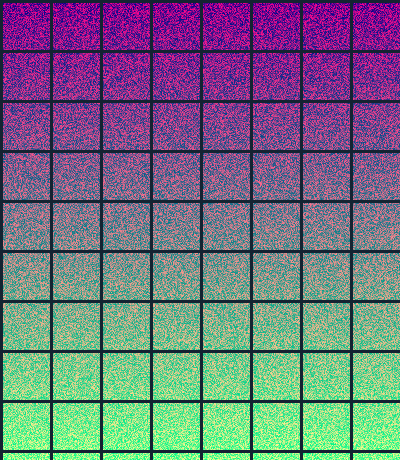
Our synthetic test chart is a PNG, 400 × 460 pixels, and 263,692 bytes (257.5 KB). It contains no personal photo and is free to reuse.
Download it, then select it in the checker above. Try JPG, 20–50 KB and exactly 200 × 230 pixels: enter 200 for both width fields and 230 for both height fields, and select only JPG. The original fails all three checks. After a fix, compare the reported measurements and inspect the grid in the download. Output size can vary by browser. These are illustrative settings, not an application's rules.
In our 30 September 2026 Chromium and WebKit checks, this file produced a 200 × 230 JPEG of 33,436 bytes (32.7 KB). This records one synthetic example, not typical savings or a guarantee for other images.
When a fix still fails
We also tested the following failed results on 2026-09-30 in Chromium and WebKit. The checker uses 1 KB = 1,024 bytes. Downloading an output does not turn a failed check into a pass.
1. Too little image data for a minimum size
Use the 16 × 16 solid tile (103 bytes), select only JPG, enter 20–50 KB, and set both width fields and both height fields to 16. The resulting JPEG was 761 bytes: below the 20 KB minimum. The result says “Still does not meet the requirements” and labels its download “Download anyway”. Use a suitable original; padding bytes or enlarging this tile cannot add missing detail.
Download the tiny test tile (PNG) · Tile measurements and reuse license2. Fixed dimensions prevent further shrinking
Use the original chart, select only JPG, leave minimum KB blank and set maximum KB to 1. Enter 400 for both width fields and 460 for both height fields. The result kept 400 × 460 pixels but was 3,211 bytes, still above the 1,024-byte cap. It shows the failed size rule. Change a dimension or size limit only if the receiving form allows it; a different source may be needed.
3. The entered rules contradict each other
With either file, enter minimum 50 KB and maximum 20 KB. No file can satisfy both. The checker explains the impossible range and disables the fix. Recheck the original instructions and correct the fields before processing.

These synthetic cases test file rules, not facial appearance, readability or official acceptance. Open every real download and inspect its clarity and framing. If the application requires an unedited original, use its own capture or upload process instead of this fixer.
Begin with the destination’s actual instructions
A maximum size, a minimum size, an exact dimension and a maximum pixel box are different rules. Enter the complete combination shown beside the upload field instead of relying on a generic application setting.
The checker measures supported files against the values you supply. A missing or incorrect requirement can make a pass misleading, so keep the original instructions available for comparison.
Know when the measurements describe a converted copy
The fix workflow can convert supported inputs where needed. A decodable HEIC is converted locally with a notice, and later measurements describe that converted image. Browser support determines whether a HEIC can open.
Keep the original before trying a repair.
Review the conditions a measurement cannot judge
Applications can separately assess framing, background, expression, image detail or whether an edit was permitted. Those conditions need the actual guidance and a visual review.
After a repair the result is checked again and remaining failures are reported. A smaller file or correct width is incomplete when another entered requirement still fails.
Related tools
Frequently asked questions
- Where do I find the requirements?
- Look beside the upload field and in its instructions for accepted formats, a KB or MB band, pixel dimensions and other conditions. Enter only the rules actually stated.
- What does a 2400 × 2400 maximum mean?
- Use maximum width and height of 2400 when that is the published maximum box. It does not require a square image or exact dimensions of that size.
- Can every combination be repaired?
- No. The source and requested limits may be incompatible. Check the remeasured result and any requirements still missed before using a download.
- Does a pass establish that my photo is valid?
- It establishes a match with the entered mechanical rules. It does not determine official approval or judge every visual and application-specific condition.
- Are photo contents uploaded?
- The checking and repair workflows run in your browser. Application assets need to load, but the selected file contents are not uploaded for processing.